As it stands right now, the CRM and former AX functionality has been wrapped under the Dynamics 365 umbrella. All nice, but with the changes made to the former Dynamics AX to bring it to a modern state, and a cloud model, the old style integrations have to be “adjusted”. As announced by Microsoft, there... Continue Reading →
CRM 2016 On-Premise Install Error–InstallWindowsSearchAction failed

I’ve just done recently an install on-premise where I’ve encountered a number of issues. One of them is the following error message: Action.Microsoft.Crm.Setup.Common.InstallWindowsSearchAction failed. The service cannot be started, either because it is disabled or because it has no enabled devices associated with it. (Exception from HRESULT: 0x80070422) The message is pretty explicit, in that... Continue Reading →
How to collect feedback using the Feedback entity

I recently reviewed an ideation platform, and looking at the new features added to Dynamics CRM 2016 Update, the Feedback features caught my attention. Starting with the latest update, we now have a built-in entity called Feedback. Here’s the official documentation: https://msdn.microsoft.com/en-us/library/mt728949.aspx So, now we can not only collect feedback, but also rate records. And... Continue Reading →
How to use Word document templates in Dynamics CRM

A new feature introduced with Dynamics CRM 2016 Update on both online and on-premise is the ability to use word templates. This makes simple reporting a lot easier now, as well as provides assistance with various data print jobs. A very welcomed feature added. But let’s have a look at what this is and how... Continue Reading →
Preview Features: Organization Insights Dashboard
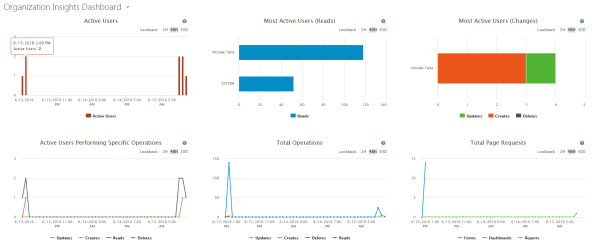
In a nutshell, this is a new dashboard that allows us to get insights into the key CRM metrics for your organization. This feature was added as a preview with Dynamics CRM Online 2016 Update 1.
 thatcrm.com