
What’s that going to do? Well, it takes a solution named solutionName and exports it in an unmanaged form to the specified path.
Dynamics 365 PowerShell using Microsoft.Xrm.Data.PowerShell Part 3

What’s that going to do? Well, it takes a solution named solutionName and exports it in an unmanaged form to the specified path.
In this part we’re looking at connecting to a D365 environment. Just like we did with the first part, we’re putting the connection code in a function. We’re doing this in order to be able to call it multiple times, depending on the environment we’re connecting to. Eventually, we’ll connect to both a source and a target environments.
Right off the bat, we’re looking at the Microsoft.Xrm.Data.PowerShell library. It’s available from GitHub
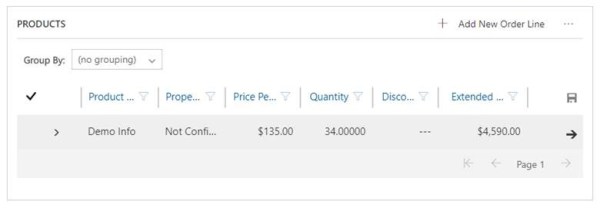
Will this UI change impact your current business processes? Moving the Write-in Products to be buried down could make a difference in your user's experience.

This one is just a quick tip. We're all used to the classical interface, as we've been configuring and testing in it since the beginning. Which is why some small things could make us pause for a moment to think. Working with Apps now is the new trick, and takes a bit of mind-bending sometimes.... Continue Reading →
 thatcrm.com